Unfortunately I think it'll take until MacBooks and iPads are literally as thin as paper (edit: hyperbole) before Japan becomes truly wifi friendly... 'til then, I'll appreciate my current MacBook and not having to carry around that dongle everywhere.
There is plenty of semi-public Wifi in Japan. You're ostensibly meant to pay into a seperate contract, but anyone who buys an iPad gets a password to use Softbank hotspots, good for two years[1].
It carries the pcie protocol but pretty obiously it's not
electrically identical to pci express (external cables
and connectors don't generally provide as good signal
integrity as required by pcie that is happening on your motherboard).
> So, there's no space in a mac for a ethernet port?
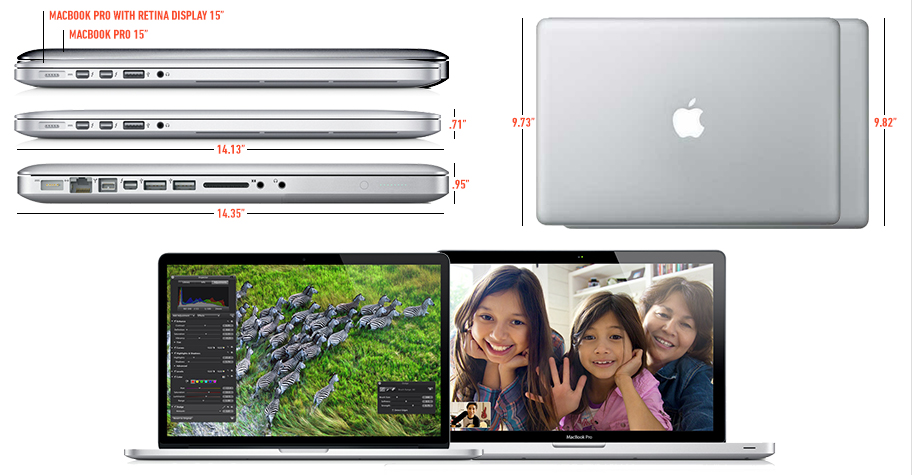
There isn't even enough depth in the machine, they would need to cut out through the lid to have the room to put an ethernet port (not even talking about the Air there, just the new MBP). Even on the current "pro" macbooks, there is only a thin piece of case above and below the ethernet port (about a third of a mm), and the new MBP is significantly thinner[0]
> what's the advantage or serializing a pci-e bus into some 4 or so pins?
Flexibility, speed, and doubles as a video adapter (and a PCI-e lane is 4 wires already, the work is not there)
You could always orient the ethernet port so it is sticking out the top of the body (or even the bottom, with a cutout to allow the wire to exist under the body) rather than the side. Of course this is far from an elegant solution, but it's not 100% accurate to say the MBP is "too thin" for an ethernet port.
edit: I did not expect such response to this comment, I think it's quite funny :)
This seems like a silly point to pick on. Why is the MBP so thin? Because of design considerations and the desires of the target market. The design considerations are a serious component of the Apple brand, perhaps the single most distinguishing component. To compromise on the design to work-around the thinness which is in service to the design would just be pointless.
It may not be accurate and complete and without flaw, but it is a reasonable reduction of the reality of Apple hardware to an understandable and useful form. The difference in thickness is profound, and would have been compromised itself, or have forced a compromise elsewhere in the design of the base hardware platform, without the removal of the Ethernet port due to physical space constraints that arose from the level of space reduction that was possible with this revision of hardware.
I think that's a pretty interesting point. The Thunderbolt adapter is a design compromise and a crappy one, but it is a general-purpose one (i.e. there is a consistent peripheral platform) and one that will not impact the vast majority of users. Copper Ethernet is not at the top of Apple laptop users' desire, as one might note conversely design is. There's a sort of elegance in systematizing the edge cases and making the base case streamlined, minimal, satisfactory, beautiful and shockingly-thin.
100M ethernet is about as fast as disks were over 12 years ago. Currently slowest mechanical laptop drives do about 500-600 Mbps, fastest SSDs about 5 Gbps.
802.11g is about 24 Mbps half-duplex in ideal conditions, so for example if you're sending 12 Mbps, you can receive at most 12 Mbps. 802.11n ups this to 30-100 Mbps range half-duplex, in rare cases a bit more.
100M ethernet is generally full-duplex, so you can send and receive very near to 100 Mbps speeds. And so is 1000M ethernet. And unlike wireless, they actually operate very close to rated speeds.
I'd say 802.11n can replace 100M ethernet in some use cases, like casual internet usage. Wifi has still a long way to go before it can truly replace cables.
I recall PCMCIA cards that had slide-out ethernet ports. They definitely would have worked with the Air, though they would probably feel "cheap" compared to the rest of the build quality. Dongles always feel cheap somehow, though.
> I recall PCMCIA cards that had slide-out ethernet ports.
PCMCIA requires quite a bit of internal space though, an ExpressCard/34 uses roughtly the same internal volume as a sodimm. That's a lot compared to a TB port.
> Dongles always feel cheap somehow, though.
Yeah, but an expresscard would look and feel even cheaper.
Funnily enough, yes, there is not enough space. If you look at the Macbook Air or the new Retina Macbook Pro, the cross-section is too small for a full-sized ethernet port.
For reference, the ethernet port takes up the entire height of the "old" MBP.
A Thunderbolt port can be Ethernet, FireWire, DisplayPort, HDMI, or native Thunderbolt. The flexibility of that makes a port that can only be Ethernet seem like a total waste of space (especially at twice the size).
Interestingly, the Retina MBP has a combo Ethernet MAC/PHY + memory card reader chip of which they're only using the latter function. I would guess that either the decision to drop the Ethernet port was made pretty late in the process or the board designers were kept in the dark about the mechanical design until it was too late to pick a different part.
Also, a PCI-E lane actually is 4 pins :)
Edit: reply to dead - standalone memory card reader ICs are standard components. The USB SD ICs they used in earlier models would have been easier to route (than the PCI-E combo chip) and probably cheaper.
I note from Anandtech's review that there were serious problems with the SD reader in earlier models, so perhaps they were deliberately avoiding those ICs?
Even if they wanted to include ethernet, the retina MBP is so thin it wouldn't be able to fit an ethernet port along the edge. Look at this image for reference:
I'm a network Engineer and even I have to work hard to remember the last time I used an Ethernet port. Configuring routers and switches and testing scenarios are mostly done remotely via labs (although I do configure and test locally a lot as well)
As far as end user goes and my daily life outside work, I very rarely use Ethernet. I suspect the average user just doesn't have the need for it any more.
VOIP? You just identified the _single_ example of an application that has minimal requirements for bandwidth (on the order of 30-40 kbits/sec is fine). I live, eat, breath on Skype, have never had a single Skype call over a wired connection. Ironically, the one persistent flaw in my recent Skype calls have been my comcast line that periodically starts dropping 3-5% of it's packets so I've had to switch over to tethering over my iPad with Verizon's Data (also wireless - so, Wireless WIFI from my MBAir over Wireless LTE) - Rock solid.
Bandwidth isn't the problem, rather dropped packets and increased latency. Neither are fatal, but add to poor experience voip has been compared to a pots connection.
So - I will agree that dropped packets are a problem (I'm having them myself with Comcast Cable - argh!!) - but WiFi connections, except under the most _extreme_ circumstances, don't ever drop packets unless you have a RF/hardware problem that is unusual. (Or Contention - which is why I don't like to share WiFi on a consumer Wireless router) Latency over WiFi is < 1ms - which should be imperceptible to VOIP.
I should set up a Skype call from my MacBook Air tethered to my iPad over Verizon LTE to you - this really is a much worse scenario than WiFi - 35ms latency, about 1% packet loss - than my WiFi connection - but I still bet you would hear stellar voice quality (over my MBAir's Mic, no less!)
Honestly - WiFi really, really is not a problem with VOIP unless you have some contention, RF disturbance or really poor connectivity - something else is going on with you - I've done lots of Voice Tests ahead of important meetings when I'm presenting just to be 100% certain that my call/voice quality was 100% - and it's always been with Skype over WiFi.
The 5% of users that do need an ethernet cable will be well served with a thunderbolt/USBx adapter without holding back the other 95% of us greedy bastards who continue to demand thinner/lighter.
> They must be certain that ethernet port is a thing of the past
And they are probably right. For consumer applications, wi-fi already fulfills most needs right now (faster than most internet connections and spinning HDs), and it's getting faster[1].
Perhaps the average consumer's satisfied with wireless speeds, and it would make economic sense to reduce the production cost of the average system by removing the ethernet port.
Ethernet cables have saved me quite a few times while installing Linux. (But that's irrelevant to apple, they don't even need to concern themselves with drivers.) Besides that I haven't really needed an ethernet cord all that often for my laptop. (Or at all really.)
For my desktop, depending on your definition of "use" (If that means installing an ethernet cable, or connecting to a network with one.) I last used one a few weeks ago, or right now.
Those of us who work in classified locations or on classified projects are not allowed to use wireless. Also, since when have we been able to push 1000 Mbps over Wireless?
And in the cases that it's not, having to use a $30 dongle on a $2200 machine is just not a big deal.
As an aside, if an office is paranoid enough to lock down well encrypted Wifi, I wouldn't be surprised if Thunderbolt got the boot as well.
It's built like Firewire; devices that are plugged in have direct access to the host machine's memory. Though at least it now has the ability to mask off sections of memory.
An attack via a malicious network adapter doesn't sound out of the question. Seems like it would be on the same level of plausibility as sniffing WPA2 traffic and decrypting meaningful information from it.
Thunderbolt requires physical access to the machine. Wireless can leak and potentially be available outside of the building. That it is the biggest concern with Wifi.
Is there a likely hood of WPA2 AES being cracked? Yes, it is very small but it is still possible. Also if a secure device is captured by an attacker and they steal the credentials to access the wireless network they can now come and go as they please. At least with physical they would have to enter the building and plug in.
Are other attacks feasible, absolutely and I will grant that, but having wifi enabled just doesn't work for certain situations and where paranoia runs high due to the work that is being done.
Sure, but having a $30 dongle available just makes my life a whole lot simpler. I wish it was still integrated, but it may simply be too large of a connector to that meaningfully. I can live with that.
Used mine today to run a full time machine backup in around an hr. Over wireless it would have been 10 times that. While doable, it would have been annoying.
In a Macbook Air? No, there certainly isn't. Even other notebook manufacturers are hitting a thiness where ethernet is not possible. They just have tacky hinge pieces that fold down to allow the ethernet connector to slide in.